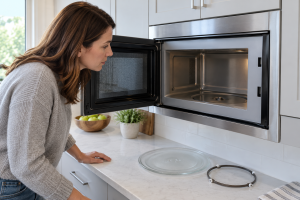
A Turning Plate and a Heating Microwave Are Separate Jobs
A microwave can make the familiar fan sound and heat a cup of water while its glass tray stays still. The turntable has its own support ring, center coupler, and small drive motor. A dried splash under one roller can be enough to make a tray drag. A chipped coupler or failed motor is a different problem, but it should not be the first assumption.
Whirlpool and GE both tell owners to check tray placement, obstructions, and the Turntable Off control before calling for service. Some models intentionally stop rotation for large cookware or special modes; others use a different design without a spinning plate. The model manual settles which behavior is normal. Food that heats unevenly is a clue, not proof of a broken magnetron.
The safety boundary is sharp. Removable glass and roller parts are homeowner territory. The cabinet, high-voltage system, and door interlocks are not. The FDA advises against using a microwave with a damaged door or latch. For a machine that runs but does not heat, see microwave runs but does not heat; for arcing, see microwave sparking.
If the symptom persists after the safe checks, these related guides and service options can help: Microwave repair, Microwave runs but does not heat.
Step-by-Step Troubleshooting
1. Stop and let the cavity cool
Hot dishes and steam can cause burns. Turn the microwave off and remove the food only when safe. If there was smoke, arcing, a burning smell, or a damaged door, do not run a test cycle.
2. Confirm this model uses a spinning tray
Some flatbed or stirrer designs do not rotate a glass plate. Look up the model number and manual before diagnosing a nonexistent turntable motor.
3. Check Turntable Off and the cooking mode
Look for a Turntable Off setting, special mode, or a timer that counts down without cooking. Restore normal cooking and turntable operation according to the manual, not a guessed button combination.
4. Reseat the glass tray
Lift out the cool tray and set it back on the center coupler and support ring. A tray set upside down or off-center may scrape instead of turning. Do not run the appliance with a loose tray.
5. Clean the roller ring and track
Remove crumbs and dried spills from the cavity floor and ring wheels with mild soap and water, following the manual. Dry all parts thoroughly. Never pour cleaner into the center opening or use a sharp scraper.
6. Look at the removable coupler
Some models let an owner lift off a small center coupler for cleaning. If the manual permits that, inspect it for a visible crack or stripped shape after unplugging the unit. Do not reach under the cavity floor.
7. Try an ordinary, correctly sized dish
A wide or heavy dish may touch the wall or drag on the ring. Use a microwave-safe cup or bowl that clears the cavity sides and sits flat on the tray.
8. Run one brief water test
Place a microwave-safe cup with water in the center and use a normal short cook cycle. Watch through the closed door. If the tray remains still, record whether the motor hums, clicks, or stays silent. Never operate an empty microwave.
9. Separate rotation failure from heating failure
If the tray turns but the water remains cold, the problem is not the turntable. If the water heats while the tray stays still, the heating system may work but rotation does not. A technician can use that distinction.
10. Stop when removable checks are exhausted
Persistent stalling, grinding, or no rotation after cleaning needs diagnosis of the coupler, motor, wiring, or control. Cabinet removal and live testing are not homeowner steps.
Brand-Specific Considerations
Whirlpool and KitchenAid: Some models provide a Turntable Off setting. The manual describes when it may be used and how the plate should sit on the support.
GE: GE’s owner guidance starts with tray centering, ring debris, the cook function, and any turntable switch before recommending service.
Samsung and LG: Control names and sensor modes vary. Check that the chosen mode normally rotates the tray and record any error code rather than trying random resets.
Sharp, Bosch, and microwave drawers: A drawer or flatbed design may not have a conventional visible turntable. Confirm the design before treating lack of rotation as a fault.
Repair vs. Replace Guidance
A damaged roller ring, tray, or removable coupler may be a modest fix. A turntable motor in a built-in or over-the-range microwave can also be worth repairing when the unit heats properly and the door is sound, though access and labor matter. Compare replacement for an older countertop model if the repair requires expensive internal parts, or if heating, door, and control problems coexist. Never treat a damaged door as a cosmetic issue.
Appliance Lifespan Table
Refrigerator: 10-15 years. Maintenance priority: clean coils, protect door seals, and keep temperatures steady.
Freezer: 10-20 years. Maintenance priority: keep vents clear, check gasket contact, and defrost models that require manual defrosting.
Dishwasher: 8-12 years. Maintenance priority: clean the filter, inspect spray arms, and avoid blocked drain paths.
Washing machine: 8-12 years. Maintenance priority: avoid overloading, use the right detergent amount, and inspect hoses.
Dryer: 10-13 years. Maintenance priority: clean the lint filter, vent path, and exterior termination.
Range or oven: 10-15 years. Maintenance priority: keep burners, igniters, caps, racks, and controls clean.
Maintenance Checklist
- Wipe spills from the cool cavity floor before they harden.
- Keep the roller ring and tray clean and seated after washing.
- Use cookware that fits without touching the walls or dragging.
- Check Turntable Off when a large dish has been used.
- Treat door or latch damage as a stop-use condition.
Safety Section
Never run a microwave empty for a rotation test. Do not remove its outer cover, bypass a door switch, or assume unplugging has made internal high-voltage parts safe. Stop using a microwave with a bent door, damaged latch or seal, arcing, smoke, or a burning smell. The FDA advises discontinuing use when the door will not close firmly or the oven appears to operate with the door open. Move only cool, removable tray components during homeowner checks.
What to Tell the Technician
Give the model number and explain whether the food still heats, whether Turntable Off was selected, and whether the tray jerks, hums, or never moves. Mention cleaning and reseating the ring, any cracked coupler, and any door damage. A short video through the closed door can be useful if no safety warning is present.
Key Takeaways
- A nonturning tray does not by itself mean the microwave has stopped heating.
- Seat and clean the cool tray, ring, and approved removable coupler before suspecting the motor.
- Check Turntable Off and model-specific modes.
- Keep all cabinet and door-interlock work with qualified service.
Homeowner Actionability Score
24/25. The reader can identify mode settings, clean and seat removable parts, and run one safe water test. Motor, wiring, and high-voltage cabinet access are excluded.
Editorial Standard
This article was technically reviewed for homeowner safety, practical troubleshooting value, answer-engine clarity, link accuracy, and current appliance repair practices. Recommendations follow manufacturer guidance, public safety sources, and the Universal Appliance Repair Knowledge Base v6.0.
Sources and Further Reading
Author Information
The Universal Appliance Repair Certified Expert Team consists of experienced appliance repair professionals with more than 25 years of combined hands-on experience servicing residential appliances. Articles are reviewed using manufacturer guidance, current industry best practices, and practical field experience.